Using Backward Design for Course Development

A practical framework for building accessible, engaging, and outcome-focused online learning experiences
How this helps
Teresa Sienkiewicz is assistant professor of nursing, Brian Kaminski Jr. is assistant professor of nursing, and Tammara Copeland is Lecturer II in nursing, all with the University of Michigan-Flint School of Nursing.
Course development is one of the most challenging tasks that faculty, new or experienced, face. Implementing backward design principles can be a solution for creating a dynamic and focused course with priority on achieving learning outcomes. In the case of one of our online courses, implementing backward design led to a drastically reduced failure rate.
Backward design ensures clarity and alignment of learning outcomes, assessments, and instructional material from the start. Regardless of whether the instruction is online, face-to-face, or hybrid, backward design gives faculty a seamless way to design their course, and students a clear, accessible learning experience.
Removing Noise with Backward Design
Maximizing learning opportunities while meeting student and faculty needs is a priority design goal, and why backward design is an important tool.
Faculty and students have similar obstacles in today’s college classes. Workload, time management, and the ability to meet submission deadlines are frequent concerns for both students and faculty. Mental health challenges are also increasingly present in the student and faculty populations.
| Students | Faculty | Both |
|---|---|---|
| Studying | Course preparation | Work |
| Class time | Office hourse | Family |
| Homework | Research and scholarship | Exercise |
| Group work | Teaching | Nutrition |
| Extracurriculars | Grading | Self-care |
| Student life | Faculty life | Hobbies |
| Volunteering | Service | Quiet moments |
Competing time demands are additional stressors, and backward design recognizes and accounts for student and faculty workload. It can be a solution for instructors, helping them to create a course that has clear, efficient navigation. With all relevant tools and information organized and available, learners can easily engage and begin their learning journey.
Backward Design Process
Backward design follows the principles of intentional planning and development in a three-step process. Step one is to identify the desired learning outcomes. Assignment, course, program, and accreditation learning outcomes can be included in the design process.

The next step is assessments. Faculty determine how students will demonstrate achievement of learning outcomes through formative and summative assessments.
Step three starts with the instructional content. Faculty choose learning materials and develop instructional activities to support the assessments. Thus, course development is focused and intentional, and faculty intuitively know what content to teach. Lectures are easier to create, and this makes a sleek pathway to learning and meeting the identified learning outcomes.
Advantages of Backward Design
An important advantage of backward design is the intentional focus on each step of course development, helping faculty make informed decisions to differentiate teaching, scaffold complex ideas, and select meaningful and equitable content.
- Purposeful learning: Faculty judiciously select pertinent learning materials for each individual outcome. This helps eliminate excess assigned learning, which reduces cognitive overload and assignment burden.
- Reduce fiscal burden: Intentionally matching educational materials to specific course assignments and learning outcomes provides an opportunity to take advantage of open education resources, which may reduce textbook costs and workload. This helps meet the financial and workload needs of students.
- Accessibility: Implementing inclusive teaching strategies is essential to support diverse student populations, including those with visual, hearing, and learning differences (Porta & Nawas, 2026). Accessibility increases as technology is implemented in the backward design process. For instance, multiple assessment modalities, learning strategies, textbook costs, and time efficiencies can be pre-planned to meet diverse student needs. This helps scaffold complex ideas and select meaningful content that is equitable for all students.
Disadvantages of Backward Design
Faculty need to understand the potential disadvantages of backward design. Backward design can limit spontaneity, creativity, and flexibility within the learning environment. Backward design can result in a tightly structured class that prioritizes meeting the defined learning outcomes.
Faculty can help mitigate the disadvantages of a tightly designed structure by incorporating learning activities that encourage social interaction and group activities.
Group Activities
- Discussion boards using voice threads, videos, or concept maps
- Debates
- Role-playing with audio or video recording
- Social media annotation apps such as Perusall
- Collaborative digital spaces
- Peer reviews and feedback
- Group presentations with questions and answers developed and presented by students
Additionally, backward design commonly frontloads faculty work, as the design process requires significant time and creative energy to complete. Faculty should reflect on their ability to commit the time to work through and complete the creative process prior to the start of the course.
Where Structure Meets Taxonomy
Structures are a content-free instructional strategy that helps create predictable interactions between students, faculty, and course content (Kagan, 2021). Thoughtfully designed course structures serve as a road map for students with all needed information and tools available for success in the course. This may inhibit deeper learning and thinking when students are working within the defined course.
Structures
- Collaborative group projects
- Collaborative digital spaces
- Guided research plan
- Group discussion boards
- Communication quizzes
Incorporating and following a learning taxonomy, such as Bloom’s, can ensure learning and assessments meet the required learning levels.
A common mistake when designing courses is neglecting to scaffold the complexity of assessments and materials because it’s easier to develop lower-level learning, such as memorization or micro-tasks. Using a learning taxonomy ensures your learners can reach higher assessment levels.
NUR 307
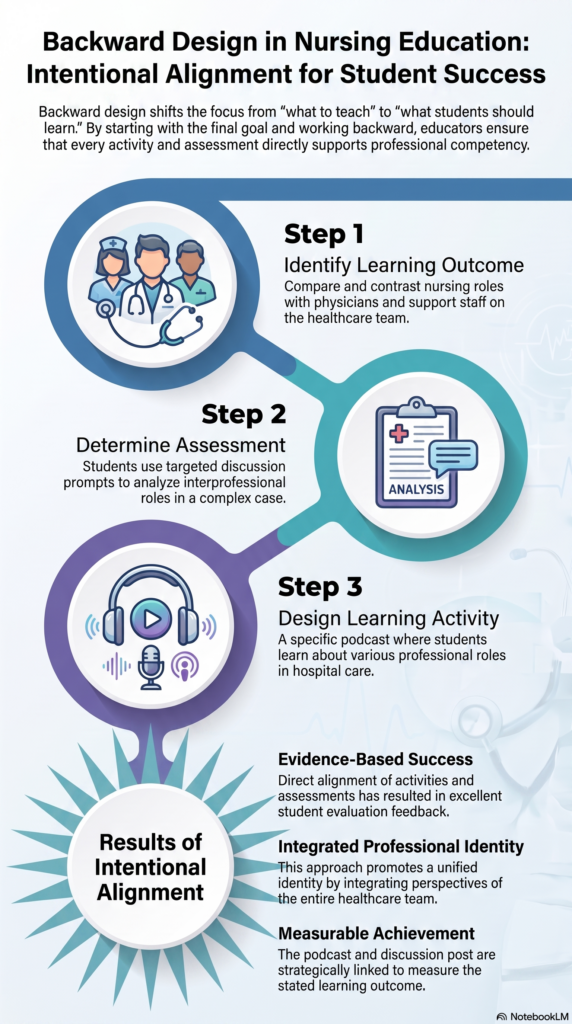
We developed NUR 307, an asynchronous nursing course, using backward design. Figure 2 illustrates the process of developing a learning activity using these principles. Our example of implementing backward design for this nursing course shows the steps using a design template.
- Identify the learning outcome. For our course, we used the following prompt: Compare/contrast the roles and perspectives of the nursing profession with other care professionals on the healthcare team.
- Determine assessment. The faculty brainstormed and developed a discussion board structure. We divided the class into multiple groups, each with a different case study topic, such as cardiac-atrial fibrillation, Alzheimer’s, or chronic obstructive pulmonary disease (COPD). Each student conducted research and posted on their assigned topic, then responded to questions on other topics. This results in students researching and writing on one topic while discussing and learning about other case studies.
- Design learning activity. Students were asked to listen to a podcast about various roles in a complex hospital patient care situation. The students analyzed members of the healthcare team, including physician, nurse, support staff, patient, and family/support system.
Results and Impact
Student and course evaluation feedback has been positive. Students appreciated faculty feedback received through the intentional structure of the course, as well as using different technology. Students also liked the social aspect of Perusall.
“The Perusall sections felt like we could debrief and share relevant insights for nursing, and this was indeed valuable to my learning and nursing career.”
“The Perusall readings were a nice way to learn some of the content. I liked that we could all make comments for everyone to see. It kept the reading engaging.”
“The feedback and interactions made my learning experience enjoyable.”
“The instructor’s comments on my assignments are very inspiring and in detail.”
Previously, NUR307 had a high failure rate, which has been reduced over two years of the redesign process, from an average of seven failures per semester to zero course failures since fall 2024. Backward design, course structures, and intentional communication strategies have helped to develop this course into an efficient, valuable class for our online nursing students.
Practical Tips
Technology can be a useful tool for managing your teaching time and engagement. Get to know your work environment, learn how to use tools that streamline teaching, manage your time related to unexpected disasters, identify issues and start interventions early, and keep your students engaged.
- Google Calendar’s self-scheduling tool: Google Calendar features a self-scheduling tool that allows students to choose appointments from available times you establish. It reduces the need to “barter” student/faculty appointment times. Once created, you can add the self-schedule link to your syllabus, course calendar, communication quizzes, and module page. The appointment is added to your calendar, and an email is automatically sent to you and the student. To reduce missed appointments, reminder emails can be sent at prescribed times.
- Course announcements: You can write the announcement using Canvas’s Rich Content Editor, attach files or links, schedule it to post later, and choose whether students may reply. These can be used for group feedback. One announcement can cover a lot of information about assignment performance. We typically include what went well, what information was learned, what needs to be reinforced, and tips on how to integrate improvements in upcoming assignments. This can help focus your individual feedback on student-specific items.
- Video walkthroughs: Take the time to record a video using your preferred recording tool. Canvas has Kaltura media available for all instructors and students. It is helpful to record a walkthrough of your Canvas setup, assignments, rubrics, or anything that may be confusing. Videos should be short, cover only one topic, and be easily located. Use your course announcements to provide anticipatory guidance for upcoming modules and assignments, and link appropriate videos in your announcement.
- Collaborative spaces: Use collaborative spaces such as Google Drive folders or Google Sites to quickly involve your students and communicate about group projects. These spaces should be made before the course starts. Communicate instructions and helpful video tutorials on day one so students can engage without delay.
- Emails and academic alerts: Do not hesitate to contact students via email about grading issues. Faculty should initiate this process and help the student find a path to success. Academic alerts are available through the Canvas LMS, which will notify the student’s advisor to reach out to the student.
- Use Perusall: Perusall is an annotation and collaboration tool. Faculty can share Open Education Resources or current peer-reviewed literature, which can be easily updated each semester and saves the students money. Students stay engaged with their reading assignments and enjoy the social media-type platform.
- Quizzes: They are not only assessments of students’ knowledge. Quizzes can serve as communication touchpoints during the course that help students and faculty stay connected. Early identification of student issues and prompt intervention can avoid end-of-semester disasters. Examples of quiz questions might include:
- Give a brief reflection of this week’s class, research, and project activities
- My group is communicating without difficulty — Yes/No
- If No, explain what communication barriers exist?
- I would like to meet with my instructor — Yes/No
- Include a direct link to appointment schedule
References
Bloom, B. S. (Ed.). (1956). Taxonomy of educational objectives: The classification of educational goals. Handbook I: Cognitive domain. Longmans, Green.
Kagan, S. (2021). The structural approach and Kagan structures. In N. Davidson (Ed.), Pioneering perspectives in cooperative learning: Theory, research, and classroom practice for diverse approaches to CL (pp. 78–127). Routledge.
Porta, T., & Nawas, A. (2026). Inclusion by design: A mixed‐methods feasibility study on backward design for inclusive education. Review of Education, 14(1), Article e70143.